Before You Renew: How to Audit Your Okta and Entra ID Licenses
Your Okta or Entra ID renewal is coming up. The contract lands on your desk, the number looks familiar, and the easiest thing in the world is to sign it and move on.
Don’t.
Somewhere inside that renewal is money you don’t need to spend ,ghost users still eating licenses months after they left, people sitting on Enterprise E5 tiers who’ve never touched a feature beyond email, and duplicate assignments nobody noticed because the data lives in three different consoles. In a 50,000-seat organization, these inefficiencies can quietly burn through hundreds of thousands of dollars a year.
The problem isn’t that teams don’t suspect there’s waste. They do. The problem is they can’t prove it and without proof, renewals go through unchanged.
That’s what a pre-renewal license audit fixes.
Why Most Renewal Conversations Go Nowhere
Here’s a scenario that plays out at organizations every quarter:
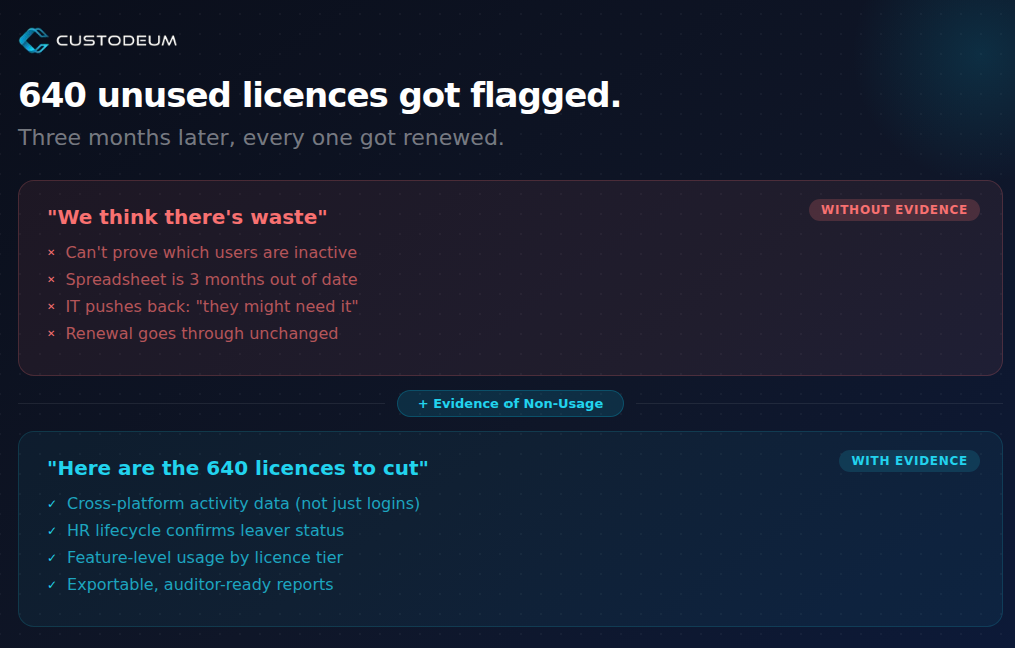
IT flags 640 unused licenses. They raise it in the renewal meeting. Procurement asks for evidence. IT pulls a spreadsheet that’s already three months out of date. The business pushes back “those users might need access.” Nobody can prove otherwise, so the contract renews at the same number.
The issue isn’t awareness. It’s evidence.
Without cross-platform usage data, last-login timestamps from a single system tell you almost nothing. A user who hasn’t logged into the Okta dashboard might still be authenticating daily through SSO. A user who “logged in last week” might have done nothing but trigger an automated token refresh.
To make a case that sticks, you need activity signals that go deeper than surface-level logins.
The Three Biggest Sources of License Waste
Ghost Users
These are the accounts that belong to people who’ve left the organization, changed roles, or simply stopped using the platform. They stay provisioned because nobody has a reliable, automated way to flag them.
In most organizations, somewhere between 15% and 30% of licenses are assigned to users with no meaningful activity in the past 90 days. That’s not a rounding error, it’s a budget line item hiding in plain sight.
The fix isn’t just finding them. It’s cross-referencing identity platform activity with HR lifecycle data so you can distinguish between “genuinely inactive” and “uses a different authentication path.”
Tier Bloat
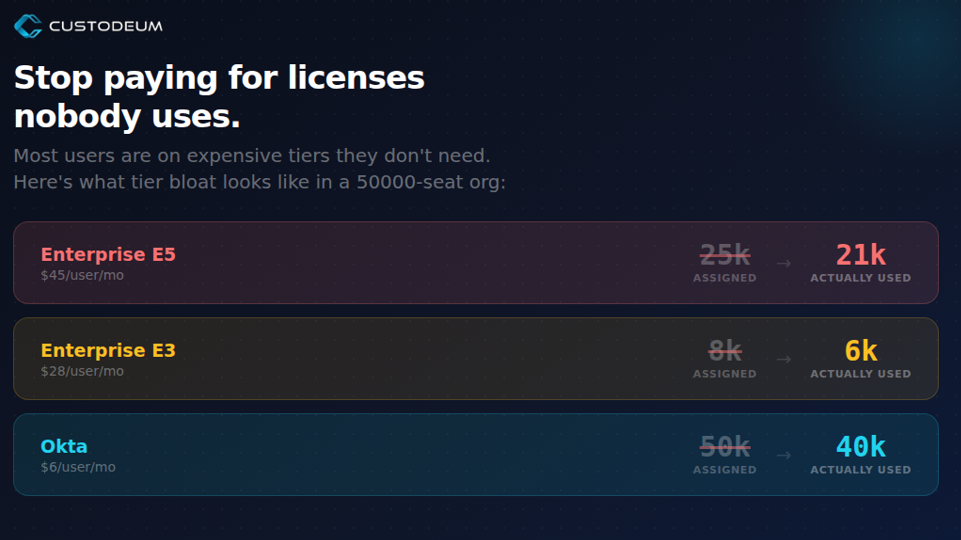
Not all licenses cost the same. An Enterprise E5 seat runs significantly more than an E3, and an E3 costs far more than a basic plan. Tier bloat happens when users are assigned to premium tiers but only use features available at lower levels.
This is extremely common after migrations, acquisitions, or rapid scaling. Someone provisions 500 users on E5 “just in case,” and two years later, 80% of them have never opened a single E5-only feature. They’re paying for advanced compliance, eDiscovery, and analytics tools that sit untouched.
Right-sizing isn’t about taking things away from people who need them. It’s about matching license tiers to actual feature usage and the only way to do that accurately is with feature-level telemetry, not just login data.
Duplicate Assignments
When organizations run both Okta and Entra ID which is more common than most people realize duplicate assignments creep in. The same user ends up with overlapping licenses across both platforms, or they’re assigned to multiple groups that each carry their own license entitlements.
No single console shows you this. Okta doesn’t know what Entra ID has assigned, and vice versa. You need a unified view across both platforms to spot the overlap.
What a Pre-Renewal Audit Actually Looks Like
A proper license audit isn’t someone eyeballing an admin console for an afternoon. It’s a structured process that produces evidence strong enough to change a procurement conversation.
Here’s what that involves:
1. Connect your identity platforms. Pull activity data from Okta, Entra ID, and your HR system into a single view. This isn’t just login timestamps it’s API activity, group membership changes, feature-level usage, and lifecycle events like role changes and departures.
2. Identify waste by category. Separate your findings into ghost users (no activity), tier bloat (wrong tier for their usage), and duplicates (overlapping assignments across platforms). Each category requires a different remediation path.
3. Build exportable evidence. The audit output needs to be something you can hand to procurement, put in front of a vendor, or attach to a compliance report. That means structured, exportable data not a screenshot of a dashboard.
4. Model the savings. Calculate what rightsizing would save annually. This becomes your negotiation leverage. When you can walk into a renewal meeting and say “We’re paying for 25,000 E5 seats but only 21,000 are actively using E5 features,” the conversation changes entirely.
How Custodeum Makes This Possible
Custodeum is an identity operations platform that connects to Okta, Entra ID, and HR systems to give identity teams a single operational layer across their ecosystem.
For license auditing specifically, the platform does three things that matter:
Cross-platform visibility. Instead of logging into Okta and Entra ID separately and trying to reconcile spreadsheets, Custodeum correlates user identity across both platforms. You see one user, one picture of their activity, regardless of how many systems they touch.
Usage telemetry beyond logins. The platform tracks actual feature usage, API activity, and group membership not just “last login.” This is what separates a credible audit from a stale spreadsheet. You can identify a user on an E5 license who only uses E3 features, or an Okta seat that’s only being hit by automated token refreshes.
Audit-ready exports. Everything Custodeum surfaces can be exported as structured, auditor-ready reports. CSV, HTML, or dashboard views whatever format your procurement team, internal auditors, or vendor contacts need to see.
Best Practices for IAM Leaders Heading Into Renewal
Start the audit 90 days before renewal. This gives you time to collect meaningful usage data, validate findings with stakeholders, and build your case before the contract deadline creates pressure to just sign.
Don’t rely on login data alone. Last-login dates are the most misleading metric in identity management. A user can “log in” via a background SSO token refresh and never actually use the platform. Insist on feature-level and API-level activity data.
Cross-reference with HR. Your HR system knows who’s left, who’s changed roles, and who’s on extended leave. If your identity platform data doesn’t include these signals, your audit will miss a significant portion of ghost users.
Present savings in annual terms. A monthly per-user saving sounds small. Multiply it by seat count and twelve months, and suddenly you’re talking about a number that gets attention in a budget meeting.
Make it repeatable. A one-off audit is useful. A continuous license optimization process is transformational. Set up recurring reviews so waste doesn’t accumulate between renewal cycles.
The Bottom Line
Every renewal is a decision point. You can sign at the same number, or you can walk in with evidence that shifts the conversation.
The organizations that save the most on identity licensing aren’t the ones with the best negotiators. They’re the ones with the best data. They know exactly which licenses are active, which are wasted, and which are on the wrong tier and they can prove it.
That’s what Custodeum gives you: the evidence to stop paying for licenses nobody uses.
Ready to audit before your next renewal? to see what your license waste actually looks like.